AI Summary
About
Wispr Flow is an AI voice-dictation app that types into any application. Instead of opening a separate transcription window, users hold a hotkey, speak naturally, and Flow inserts cleaned-up text directly at the cursor — whether the active window is a code editor, Slack, Gmail, Notion, or a browser address bar. The product runs natively on macOS, Windows, iPhone, and Android, and supports 100+ languages.
The pricing page positions Flow against keyboard typing rather than against other transcription tools — the marquee social proof is a built-in savings calculator that converts “hours/day spent typing” plus an hourly rate into a currency figure (the page assumes 2 hours/day of typing at 4,800 words and subtracts the Flow Pro monthly cost). Customer logos shown on the page include Lovable, Menlo Ventures, Clay, Mercury, Groupon, Vercel, Replit, and Nuuly; the Flow for Business page adds Rivian, Notion, Microsoft, and Gusto — a mix of consumer-prosumer brands and enterprise teams.
Since the 2026-07-22 capture the pricing, students, and business pages localise their currency by visitor country: the same page that renders $12/user/mo in the server HTML rendered ₹320/user/mo (annual) and ₹400/user/mo (monthly) from an India IP, reconfirmed unchanged on 2026-08-11. Wispr, Inc. is a US entity and does not add VAT/GST on top — the localised figure shown at checkout is the final amount charged.
As of the 2026-08-11 capture, Wispr has added a second product — Wispr Notetaker — to the same nav bar as Dictation (“Dictation | Notetaker | Business | Pricing”). Notetaker records, transcribes, and summarizes meetings and voice memos, identifies speakers, answers questions across a user’s meeting history, and can push notes into Claude, ChatGPT, and other MCP-connected AI tools. It ships bundled into the existing Free and Pro plans at no additional seat price — Free gets it on Mac only with a weekly meeting limit, Pro gets higher limits and extended note retention — while Enterprise shows “Notetaker coming soon.” No new pricing tier, seat type, or SKU was introduced; this is a packaging addition to the existing three-tier ladder, not a repricing.
Competitively, Wispr Flow occupies a different lane from transcription tools (Otter.ai, Whisper API wrappers) and from native OS dictation (macOS Voice Control, Windows Dictation). Otter and Whisper meter raw audio minutes; macOS Voice Control is free but stops at the OS chrome and doesn’t ship a custom dictionary or command-mode editing. Flow’s “type into any app via overlay” surface plus its word-quota / unlimited-words billing axis make it a productivity-tool purchase rather than a transcription-tool purchase — which is why it can charge a flat $12/user/mo seat instead of per-audio-minute.
Pricing summary : How Wispr Flow’s freemium voice-dictation pricing works
Wispr Flow uses a freemium model with a single paid tier plus an enterprise contact-sales tier, now covering two bundled products (Dictation and, as of 2026-08-11, Notetaker). There is no usage-meter above Pro — the headline $12/user/mo is the actual price for unlimited dictation, and Notetaker rides the same seat at no extra charge.
- Free tier: the pricing page labels this tier simply “Free” (previously “Flow Basic”). Dictation is capped by words-per-week per platform — 2,000 words/week on Mac or Windows, 1,000 words/week on iPhone, and (during a “limited time” promo visible on the page) unlimited on Android. As of 2026-08-11 it also includes Wispr Notetaker (Mac only) — meeting/voice-memo transcription, speaker identification, cross-meeting Q&A, calendar/Slack connection, and MCP export to Claude/ChatGPT — capped at a weekly meeting limit with standard note retention. The Free (and Pro) pricing-card copy also lists “Opt out of model training, any time” — a Privacy-settings toggle that keeps dictation out of any training corpus without requiring the Enterprise-only enforced Privacy Mode.
- Pro tier: $12/user/mo billed annually, $15/user/mo billed monthly (the Monthly/Annual toggle carries a “20% discount” label on Annual) — both figures unchanged since 2026-07-22 (INR-localized figure re-confirmed on 2026-08-11 at ₹320/user/mo, see below, and reconfirmed unchanged again on 2026-08-12). Unlimited words across all four platforms. Subscribing inside the iPhone app instead of on the web adds two Apple-only SKUs the pricing page never shows — a $4.49/week Pro plan and a $7.49/month student plan. The same Pro SKU serves individuals and teams — the Business page FAQ states there is no minimum seat count (“Pro teams can start with just two people”), and Pro includes centralized billing, user management, shared dictionary/snippets, and basic (admin-only) team usage dashboards. As of 2026-08-11, Pro’s own card copy also lists “access to advanced AI thinking models” as a named benefit (new wording, not previously on the card) and Notetaker gets higher weekly meeting limits plus extended note retention.
- Enterprise tier: contact-sales pricing — adds enforced HIPAA (BAA), SOC 2 Type II, SSO/SAML, SCIM, enforced Privacy Mode (Zero Data Retention), advanced usage dashboards, bulk discounts, dedicated support with custom invoicing, org-wide enforced opt-out of model training, and free IT-admin seats. The Business page names the qualifying profile as teams with 50+ employees or hard compliance requirements. Two caveats surfaced on this capture: ISO 27001 is described on the Business page as “working toward certification” (i.e., not yet achieved, despite the pricing-page comparison table bundling it with SOC 2 Type II in one checked row), and Notetaker itself is marked “Coming soon” for Enterprise — the one plan where the new product isn’t yet available.
- Currency localisation: list prices are rendered in the visitor’s local currency. From an India IP the pricing page showed ₹320/user/mo annual on 2026-08-11 (unchanged since 2026-07-22, and reconfirmed byte-identical again on 2026-08-12), with student pricing at ₹160/mo. Wispr, Inc. adds no VAT/GST/sales tax on top — the displayed price is the total charged, and Stripe is the named payment processor on invoices.
- Promotions and discount programs: prior captures (through 2026-08-04) documented a 14-day Flow Pro free trial bundled into the Free-tier download (no credit card); as of 2026-08-11 the pricing-page and business-page hero/FAQ copy no longer explicitly names a trial length (“Download the app to get started for free. No credit card required. No commitments, cancel anytime.” is the only lead copy, reconfirmed word-for-word again on 2026-08-12) — trial mechanics remain
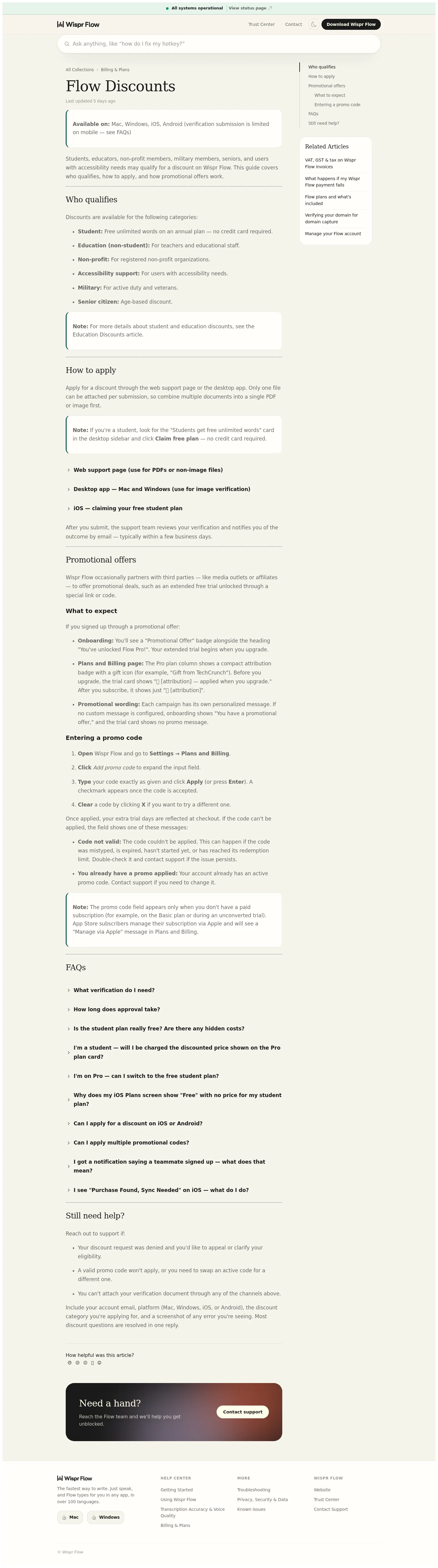
unknownpending a follow-up capture rather than asserted unchanged. Students (public marketing page,wisprflow.ai/students, unchanged as of 2026-08-12): 3 months free then $6/month (₹160/mo locally, 50% off, new subscribers only). Non-profits: $8/mo on the annual plan, plus $10 referral credit per valid referral with no cap — reconfirmed unchanged on 2026-08-12. The help-centre discount article lists six verified categories — student, education (non-student), non-profit, accessibility support, military, and senior citizen — granted by support after document verification. - Packaging update as of the 2026-08-11 capture (reconfirmed unchanged 2026-08-12): Wispr launched Wispr Notetaker, a meeting-notes/transcription product, as a second top-level product alongside Dictation (new nav item, new “Wispr Notetaker” help-center collection, new footer product card marked “New”). It is bundled into Free and Pro at no incremental seat price; Enterprise shows “Coming soon.” Separately, the verified-student free-unlimited-words plan that the Flow Discounts help-centre article newly documented around 2026-07-30 (captured here on 2026-08-04) has since been reverted: as of the 2026-08-11 capture (and still true on 2026-08-12) the same article is back to describing only “Discounted Pro pricing” for students, and the four dedicated FAQ entries about the free plan (“Is the student plan really free?”, etc.) are gone. The public
wisprflow.ai/studentspage was — and remains — unchanged throughout (3 months free, then $6/month), so the net effect for a prospective student buyer is that Wispr’s public-facing student offer is back to being single and consistent across surfaces.
What makes this different: Wispr Flow meters the user’s output (words typed) instead of the model’s input (minutes of audio captured). Transcription competitors like Otter.ai and Whisper API wrappers bill per minute of audio uploaded — Flow bills per word delivered to the user’s cursor. That structural choice lets Flow charge a flat $12 seat above the free tier instead of a per-minute meter, because the “unlimited” upgrade is bounded by how fast a human can talk, not by how much compute the model consumes.
Pricing by product
Flow (Individual and team plans)
| Tier | Price | Included | Key mechanics |
|---|---|---|---|
| Flow Free (was “Flow Basic”) | Free | 2,000 words/week on Mac or Windows (soft cap; 5,000-word hard cap); 1,000 words/week on iPhone (soft cap; 1,500-word hard cap); unlimited words/week on Android (limited time only); custom dictionary and snippets; 100+ languages; Privacy Mode (Zero Data Retention); HIPAA-ready; opt out of model training at any time (Privacy settings toggle); Wispr Notetaker (Mac only, launched 2026-08-11, unchanged 2026-08-12) — meeting/voice-memo transcription with a weekly meeting limit and standard note retention | Two-stage weekly word cap per platform (soft cap, then hard cap), per the help centre; prior captures (through 2026-08-04) documented a 14-day Pro free trial with download — not explicitly named in the 2026-08-11 or 2026-08-12 captures’ hero/FAQ copy, so trial length is unknown pending a follow-up capture; pricing-card label simplified from “Flow Basic” to “Free” |
| Flow Pro | $12/user/mo annual · $15/user/mo monthly | Everything in Free plus unlimited words/week across Mac, Windows, iPhone, and Android; access to advanced AI thinking models; prioritized support and feature requests; early access to new features; centralized billing and user management, shared dictionary and snippets, basic (admin-only) team usage dashboards; Notetaker with higher weekly meeting limits and extended note retention | Monthly/Annual toggle — Annual is labelled “20% discount”; no seat minimum for teams; quota disappears, single flat seat above free |
| Flow Enterprise | Contact us | Everything in Pro plus dedicated support and custom invoicing; SOC 2 Type II compliance (independently audited per the Business page); ISO 27001 (“working toward certification” per the Business page — not yet achieved, despite the pricing-table row bundling it with SOC 2); enforced HIPAA compliance (BAA); enforced Privacy Mode (Zero Data Retention); SSO / SAML, SCIM; advanced usage dashboards; bulk pricing discounts; dedicated IT admin seats at no extra cost; org-wide enforced opt-out of model training; Notetaker marked “Coming soon” — the one plan where the new product isn’t yet available | Sales-led quote; page names 50+ employees or hard compliance needs as the qualifying profile; security and compliance gating, not capacity gating |
Wispr Notetaker (bundled meeting-notes product, new 2026-08-11)
Wispr launched a second product — Wispr Notetaker — as a new top-level nav item (“Dictation | Notetaker | Business | Pricing”), a new “Wispr Notetaker” help-center collection, and a new “Wispr Flow Notetaker” footer product card marked “New.” It transcribes and summarizes meetings and voice memos, identifies speakers, answers questions across a user’s meeting history, and exports notes into Claude, ChatGPT, and other MCP-connected AI tools. There is no separate Notetaker price or SKU — it rides the existing Dictation seat:
| Tier | Notetaker access | Weekly meeting limit | Note retention |
|---|---|---|---|
| Flow Free | Included (Mac only) | Weekly limit | Standard |
| Flow Pro | Included (Mac only) | Higher limits | Extended |
| Flow Enterprise | Coming soon — not yet available (footnoted “*Notetaker coming soon to Enterprise” on the pricing cards) | Higher limits (once shipped) | Extended (once shipped) |
On the Business page, Notetaker is pitched as “Wispr Notetaker for Teams” with an admin usage dashboard for adoption/ROI tracking and a stated privacy boundary — “Individual recordings and transcripts stay private. Always.”
In-app purchase SKUs (Apple App Store)
Buying Pro from inside the iPhone app goes through Apple’s in-app purchase catalogue, which carries two SKUs the web pricing page never shows: a weekly Pro plan and a monthly-billed student plan.
| SKU (US storefront) | Price | Effective monthly rate | Note |
|---|---|---|---|
| Pro Weekly Plan | $4.49 | ~$19.46/mo | App Store only; the most expensive way to buy Pro |
| Pro Monthly Plan | $15.00 | $15.00/mo | Matches the web monthly rate exactly — no Apple markup |
| Pro Annual Plan | $143.99 | $12.00/mo | Matches the web annual rate exactly |
| Monthly Student Plan | $7.49 | $7.49/mo | App Store only; the web students page advertises the annual rate only |
| Annual Student Plan | $72.00 | $6.00/mo | Matches the advertised “3 months free, then $6/month” student rate |
The weekly SKU is the one genuine exception to the “one flat seat” story: at $4.49/week — about $19.46/mo — it costs roughly 30% more over a year than the $15.00 monthly plan and 62% more than the $143.99 annual plan, so it functions as a short-burst option (finals week, one project) rather than a cheaper entry point.
Regional list prices (currency localisation)
| Surface | US list (server-rendered HTML) | India-rendered list (2026-08-11 capture, unchanged since 2026-07-22) |
|---|---|---|
| Flow Pro — annual | $12/user/mo | ₹320/user/mo |
| Flow Pro — monthly | $15/user/mo | ₹400/user/mo (not re-confirmed this capture; unchanged in prior captures) |
| Flow Pro for Students | $6/mo (billed annually) | ₹160/mo (billed annually) |
| Flow Free / Enterprise | Free / Contact us | Free / Contact us (unchanged) |
No VAT, GST, or local sales tax is added on top of any of these figures — the help-centre tax article states the price shown at checkout is the total charged, with Stripe as the invoicing processor.
Promotional and discount pricing
| Audience | Offer | Mechanics |
|---|---|---|
| Trialists | Free Pro trial with download, no credit card required (14-day length confirmed through 2026-08-04; not explicitly stated in the 2026-08-11 hero/FAQ copy — unknown if length changed) | Bundled with the Free-tier download; prior captures documented a fresh trial for every teammate invited to a team |
| Students (public marketing page) | 3 months free, then $6/month (50% off Pro) | New subscribers only; auto-verified with a .edu email, otherwise student ID / enrolment proof via support; unchanged on wisprflow.ai/students as of 2026-08-11 |
| Students (help-centre, documented ~2026-07-30, reverted by 2026-08-11) | Was: free, unlimited words on an annual plan — no credit card required | Was claimed via a “Students get free unlimited words” card in the desktop app sidebar (“Claim free plan”), captured here on 2026-08-04. As of this capture the Flow Discounts help-centre article has reverted to describing only “Discounted Pro pricing” for students, and the four dedicated FAQ entries about the free plan are gone. Treat this offer as no longer live — it never appeared on the public students marketing page and does not appear on any surface as of 2026-08-11. |
| Non-profits | Flow Pro at $8/mo on the annual plan | Approval form reviewed in 2–3 days, then upgrade in-app; discount codes still stack at checkout |
| Referrers (all users) | $10 subscription credit per valid referral, no cap — or a free month of Pro | Credit applies automatically once the referred user upgrades to Pro or dictates 2,000 words |
| Education (non-student) | Discounted Pro for teachers and educational staff | Verification via the support Billing → Discount Request flow |
| Accessibility / military / senior | Discounted Pro pricing (rate not published) | Same verified-document flow; available on monthly or annual subscriptions |
Sales motions across products: PLG / self-serve download for Flow Dictation (Free and Pro tiers, annual or monthly via the on-page toggle, no seat minimum for teams) and the bundled Wispr Notetaker (Free and Pro only — Enterprise “coming soon”); sales-led for Flow Enterprise via “Talk to sales”; support-mediated for the six verified discount categories.
Hidden costs : What real users actually pay above the headline price
Archetype: heavy individual using Wispr Flow ~6 hours/day across Mac, iPhone, and Slack.
| Line item | Monthly cost |
|---|---|
| Flow Pro seat (1 user, annual billing) | $12.00 |
| Word-count overage charges | $0.00 — no overage meter; Pro is unlimited |
| Per-minute-of-audio charges | $0.00 — Wispr Flow does not meter audio |
| Per-language surcharge | $0.00 — 100+ languages are included on every tier |
| Additional device fee (Mac + Windows + iPhone + Android) | $0.00 — one seat covers all four platforms |
| Total monthly cost for this archetype | $12.00 |
This is the unusual headline finding: Wispr Flow’s $12/user/mo Pro really is the total bill for a single power user. Unlike the credit-pool or per-token models used by AI coding tools (Cursor, GitHub Copilot Premium) and unlike the per-audio-minute models used by transcription tools (Otter.ai, Whisper API wrappers), Pro has no second meter that activates after a threshold. The hidden cost lives in the previous tier instead: Flow Basic’s 2,000-words/week cap on Mac and 1,000-words/week cap on iPhone is well below what a daily user generates — a typical 2-hour-per-day speaker produces ~24,000 words/week, so Basic capacity runs out on day one or two of any real use, forcing the Pro upgrade.
For a team, the only multiplier is seat count: 10 users on Pro annual = $120/mo flat, with zero variability month-to-month regardless of dictation volume. Enterprise pricing is gated to “Contact us” and the page does not disclose a per-seat list price for it.
Want to estimate your own Wispr Flow bill? Use the Wispr Flow pricing calculator to compare Pro-seat cost against your current typing time and hourly rate (the page’s built-in savings calculator suggests $1,088/mo of time-value saved at 2 hr/day and $50/hr — your mileage will vary).
Pricing evolution : How the model changed over time
Cadence
| Quarter | Price changes | Product / SKU additions | Notes |
|---|---|---|---|
| 2024 Q4 | 1 | Free + Pro launch | $12/user/mo annual Pro tier set at Product Hunt debut. |
| 2025 Q1 | 0 | Windows app | Cross-platform Pro seat — no per-platform surcharge. |
| 2025 Q2 | 0 | Flow for Business | Team Dictionary, Team Snippets, centralized billing and admin controls ship onto the existing Pro seat — no separate Teams SKU, no seat minimum. |
| 2026 Q1 | 1 (monthly) | — | Monthly billing reportedly stepped from $12 to $15; annual held at $12. |
| 2026 Q3 | 1 (geographic) | Non-profit rate + referral credit documented; help-center-only free student plan surfaces (2026-08-04) | List price becomes country-localized: US unchanged at $12/$15, India renders ₹320/₹400 (₹160 student). Non-profit Pro at $8/mo annual and a $10 uncapped referral credit get their own pages. A verified-student-only free unlimited-words plan is now documented in the help center, unreconciled with the public students page. |
Tracked range: 2024–2026. Public-record milestones drawn from Wispr Flow press releases, the Product Hunt launch, TechCrunch and Bloomberg coverage, and the official docs help-center.
Notable changes
- 2024-10-01 — Wispr Flow ships the macOS app and launches on Product Hunt, hitting #1 of the day and the week. The launch debuts the Free + Pro freemium structure at $12/user/mo (annual). The companion Show HN thread introduces the product to the developer community (Product Hunt teardown).
- 2025-03-12 — Wispr Flow for Windows ships, extending the same $12/user/mo Pro seat to a second desktop OS at no additional fee (PR Newswire announcement).
- 2025-06-24 — Wispr Flow raises a $30M Series A led by Menlo Ventures and rolls out Flow for Business — Team Dictionary, Team Snippets, centralized billing, admin controls, and enterprise security gating (TechCrunch coverage). Notably, none of it became a separate SKU: business features landed on the existing Pro seat, and the Business page still answers “no minimum” on team size. A help-centre article that once described a distinct Teams rate has since been retired (it 404s as of 2026-07-22, replaced by the Billing & Plans collection), leaving one paid self-serve price for individuals and teams alike.
- 2026-05-12 — Bloomberg reports Wispr is in talks for a $260M Series B at a $2B valuation; the headline annual-billed Pro price has held at $12/mo throughout. Third-party trackers report the monthly-billed rate stepped from $12 to $15 in early 2026 (Bloomberg).
- 2026-07-22 — The list price becomes country-localized. The same capture vantage that rendered
$12/user/moon 2026-05-24 now renders₹320/user/mo(annual) and₹400/user/mo(monthly), with students at₹160/mo, while the server-rendered HTML still carries the unchanged $12/$15 US list. At roughly 32% of the US rate at spot FX — the same coefficient on all three figures — this is a purchasing-power price point, not a currency conversion, and it is the first time Wispr has moved price along an axis other than billing cadence. For buyers, the cost impact is asymmetric: nothing changes for a US team, while a 10-seat Indian team pays about $38/mo instead of $120/mo. For billing complexity, the surface stays simple — one paid seat, no VAT/GST gross-up, Stripe invoicing — but price discovery gets harder, because the number a buyer sees now depends on where they browse from. The same window documents non-profit Pro at $8/mo annual, a $10 uncapped referral credit, and six verified discount categories (student, education, non-profit, accessibility, military, senior). - 2026-08-04 — The Flow Discounts help-center article (last updated ~2026-07-30, per its own “5 days ago” timestamp) starts documenting a second student offer: a free, unlimited-words annual plan claimed via a “Students get free unlimited words” card in the desktop app sidebar, with a “Claim free plan — no credit card required” button and four new FAQ entries (e.g. “Is the student plan really free? Are there any hidden costs?”, “I’m on Pro — can I switch to the free student plan?”). This is a packaging addition, not a price move: the public
wisprflow.ai/studentsmarketing page is unchanged the same day and still advertises “3 months free, then $6/month.” Buyer impact is currently narrow and provisional — the free plan is verified-student-only, discoverable only inside the desktop app and help center, and its mechanics (duration, downgrade path, word ceiling if any) aren’t documented anywhere a prospective buyer would land first. For billing complexity, this adds a second unreconciled student price path on top of the geographic axis introduced two weeks earlier — the same legibility gap (what you’re charged depends on which surface you find) now applies within a single segment, not just across countries.
What’s unique : Distinctive pricing mechanics
1. Meters output (words delivered), not input (audio captured). Every direct competitor — Otter.ai, Whisper API wrappers, Superwhisper at a higher tier — meters the model’s input: how many minutes of audio you record. Wispr Flow meters the user’s output: how many words land at the cursor. That structural choice is what allows the headline Pro tier to be a flat $12/seat unlimited price instead of a per-minute meter, because human speaking speed bounds the bill even when the dictation feature is used continuously.
2. Per-platform word quotas on the free tier, not a single global cap. Flow Basic is uniquely split — 2,000 words/week on Mac or Windows desktop, 1,000 words/week on iPhone, and (during a 2026 promo) unlimited on Android. Most freemium SaaS gives one global usage budget that resets monthly; Wispr Flow’s per-platform split lets the company calibrate the squeeze per device (heavier on mobile, lighter on Android during platform launch) and weekly resets shorten the upgrade decision window from one month to seven days.
3. The Pro seat is the entire product across four operating systems. A single $12/user/mo seat covers macOS, Windows, iPhone, and Android with no per-device fee, no platform-specific upsell, and no “Teams” tier required to unlock the second OS. This is unusual in the productivity-tool category — most cross-platform apps either gate non-desktop platforms behind a higher tier (Notion AI, Bear) or charge per-device licensing (1Password historically, Microsoft 365). Flow’s posture treats the OS overlay itself as the product surface, so platform expansion is a feature shipped to existing seats rather than a new SKU.
4. One purchasing-power coefficient applied to the whole ladder — including the ROI pitch. Since 2026-07-22 the page renders local currency by visitor country, and the striking part is how mechanical it is: $12 → ₹320, $15 → ₹400, and the $6 student rate → ₹160 all land at ~32% of the US figure at spot FX. Wispr didn’t reprice SKU by SKU; it applied a single country multiplier to the whole freemium ladder and left the two non-numeric tiers — free Basic and “Contact us” Enterprise — currency-neutral, so the geographic axis touches exactly one price. The savings calculator moves with it: the default “my time is worth” input localises from $50/hour to ₹1,500/hour, which keeps the advertised payback at roughly 100× the seat price in both markets (₹33,000 saved against ₹320, versus $1,100 against $12) instead of producing an implausible 800× claim from an un-localised hourly rate. That is a deliberate choice to localise the argument for the price, not just the price — most vendors that add regional pricing leave the ROI copy pinned to US assumptions and quietly break their own math.
Strengths & weaknesses
| Strengths | Weaknesses |
|---|---|
| Flat $12/user/mo Pro covers Mac, Windows, iPhone, and Android — no per-platform or per-device upsell, and the same SKU scales seamlessly from solo to teams. | No published Enterprise list price — security and SSO/SAML are gated behind a “Contact us” wall, blocking self-serve evaluation by mid-market teams. |
| Output-metered model (words delivered, not minutes of audio) keeps Pro unlimited without an opaque second meter — the $12 headline is the actual monthly bill. | Team usage analytics are under-sold on Pro — the admin portal already ships a Team Members table and a words-dictated CSV export, but the plans matrix marks the row “Basic” on Pro versus “Advanced” on Enterprise without saying what either contains, so buyers assume seat-utilization visibility is Enterprise-only. |
| Free tier is generous enough (2,000 words/week ≈ 8 minutes/day of dictation) to be a real product, not just a demo — drives the reported ~20% free-to-paid conversion. | Free-tier word quota is split per-platform (2,000 desktop / 1,000 iPhone / unlimited Android promo), which is harder to communicate than a single global cap and surprises mobile-first users. |
| Country-localized pricing (from 2026-07-22) cuts the effective seat price to ~32% of US list in markets like India without touching the US number, widening the addressable base while preserving the “$12 since launch” stability story. | The localized price exists only client-side — the server HTML still says $12 — so no page states the country rule, no rate card lists the regional prices, and the six discount categories are granted by support ticket rather than a checkout code. A buyer cannot work out what a mixed-geography team will actually pay without opening the page from each country. As of 2026-08-04 the same pattern repeats within a single segment: the help center now documents a free unlimited-words student plan that the public students marketing page doesn’t mention, so even a student who reads wisprflow.ai/students end to end will not learn the free option exists. |
| Annual billing carries a clean 20% discount surfaced via a one-click toggle, and the Pro price has held at $12/mo (annual) since the October 2024 launch — pricing stability is unusual in AI tools. | Trust drag from the 2025–2026 community privacy episodes (auto-startup behaviour, background telemetry, the HN “tracking every app/URL” thread) — the pricing page makes Privacy Mode visible but doesn’t acknowledge the history. |
Billing UX : Specific named controls
- Monthly / Annual toggle with “20% discount” callout — a two-button switcher at the top of the pricing grid. Annual is the default and the price card label “billed annually” appears directly under the $12 figure when Annual is selected.
- “Download the app to get started for free” hero CTA, no credit card required — as of 2026-08-11 the pricing-page and business-page hero copy reads “Download the app to get started for free. No credit card required. No commitments, cancel anytime.” Unlike the prior capture, neither page’s hero or FAQ copy explicitly calls out a “14-day Flow Pro free trial” in this capture — the trial mechanics themselves are not reconfirmed this run (
unknownwhether the trial length changed, moved to in-app-only messaging, or was simply dropped from the web hero copy); flagged for a follow-up capture rather than asserted as removed. - Plans & features comparison matrix — a long-form table now grouped by Effortless dictation, Notetaker (new section, new 2026-08-11), Meetings, Team & collaboration features, and Security & compliance features, with explicit ✓ / ✗ / text marks per tier (e.g., Word limit row: Free = “2,000/week on desktop, 1,000/week on iPhone, Unlimited on Android” vs. Pro = “Unlimited” vs. Enterprise = “Unlimited”; the new Notetaker rows show ✓ for Free and Pro and “Coming soon” for Enterprise).
- Student Discount banner with dedicated CTA — a separate bordered row on the students marketing page, “Get 3 months free for finals — Auto renews at 50% off. Cancel anytime,” with a footnote “3-month trial is for new subscribers only.”
- Built-in savings calculator — a dark-green inset card titled “See how much you could save” with inputs for hours typing/team size and hourly rate, outputting “Time saved per month,” “Flow Pro monthly cost,” and “Estimated annual savings” (the Business-page version also shows a computed “ROI: 1,931%” figure).
- Centralized billing visible only on Pro and Enterprise — the comparison table calls out “Centralized billing” as a ✓ on Pro and Enterprise and ✗ on Free, signalling that consolidated team billing is a paid-tier feature rather than a free admin convenience.
- Sticky pricing nav bar — a condensed Free / Pro / Enterprise strip pinned to the top of the pricing page repeating the live price (“Pro · ₹320 / user / mo” from an India IP,
$12in the source HTML) with per-tier “Get started” and “Talk to sales” buttons, so the CTA follows the reader down the long comparison matrix. - Plan & Billing panel inside the desktop app — the FAQ routes every self-serve billing action (“upgrade from Free to Pro”, “change or cancel my subscription at any time”) to Settings → Plan & Billing in the Flow desktop app rather than to a web account page.
- Admin portal at admin.wisprflow.ai — a separate web console for creating a team, inviting members, and managing users and billing; the Business page pairs it with adoption analytics (“Track adoption”, “See results in real-time”) showing words dictated, weekly active users, and per-app/per-team filters, plus a new Notetaker admin usage dashboard (“See adoption and ROI across the whole team”) that explicitly states “Individual recordings and transcripts stay private. Always.” The help centre documents an “Admin Usage V2” view with a Team Members table and a words-dictated CSV export, plus domain verification for domain capture (auto-joining users on a verified email domain).
- Support-mediated discount request flow — discounts are not a checkout coupon: the support form (wisprflow.ai/support → Get Support, or Help → Talk to support in the desktop app) exposes a Request Type = Billing selector which reveals a Discount Request category dropdown and a single-file attachment field for verification (student ID, non-profit details, accessibility documentation, military ID, or age confirmation).
- Invoice self-service with tax-ID enrichment — invoices are downloadable per the help centre, and support can attach a company name, address, and VAT/ABN/tax ID to the billing record so they appear on all future invoices (Stripe prints a country label such as “HU VAT” next to the number; it cannot be back-applied to already-issued invoices).
- New “Wispr Notetaker” help-center collection — as of 2026-08-11 the help center’s left-nav collection list gained a dedicated “Wispr Notetaker” section (alongside the existing Getting Started, Using Wispr Flow, Transcription Accuracy & Voice Quality, Billing & Plans, Troubleshooting, Privacy/Security & Data, and Known Issues collections), matching the new “Notetaker” top-level nav item on the marketing site.
- “Students get free unlimited words” sidebar card — reverted as of 2026-08-11. The 2026-08-04 capture documented a promotional card in the Flow desktop app sidebar with a “Claim free plan” button and four dedicated FAQ entries in the Flow Discounts help-centre article. As of this capture that card and its four FAQ entries are no longer described in the same article — the article has reverted to the standard “Student: Discounted Pro pricing (availability may vary — contact support to check eligibility)” copy with the original two-question FAQ set. The discounted-Pro funnel on
wisprflow.ai/students(“3 months free, then $6/month”) is unchanged and remains the only student offer documented anywhere in this capture.
Strategic wins : Why specific pricing decisions worked
1. Choosing words-delivered as the value metric, not minutes-of-audio
Wispr Flow’s single most consequential pricing decision was metering the user’s output rather than the model’s input. Minutes-of-audio billing forces every competitor to pass through ASR compute costs as a per-minute fee, which makes “unlimited” structurally impossible. By billing in words-typed instead, Flow puts the natural ceiling of human speaking speed on the bill — a structural insight covered in our value metric problem in AI pricing post and the choosing the right usage metric guide. That single choice is what lets the headline price be a flat $12 seat instead of a per-minute meter.
2. Pricing for predictability while the underlying compute deflates
Cursor, Replit, Lovable, and Bolt all repriced major SKUs in 2025 as model costs and routing economics shifted underneath them. Wispr Flow’s annual-billed Pro rate has held at $12/mo since its October 2024 launch — even as the company crossed $10M ARR, raised $30M Series A, and entered Series B talks at a $2B valuation. Holding a stable seat price while ASR / cleanup-LLM inference costs deflate is exactly the AI margin compounding play: as compute gets cheaper, the gross margin on each $12 seat widens without any customer-facing pricing event. See also usage-based pricing in SaaS and AI for why flat pricing on top of deflating inputs is a defensible long-term position.
3. Treating the OS overlay as the product, so platform expansion is a feature, not a SKU
When Wispr Flow added Windows (March 2025), iPhone (mid-2025), and Android (2026), every new operating system shipped to existing Pro seats at no surcharge. Most cross-platform productivity tools either gate platforms behind a higher tier or use platform-specific licensing — Flow simply ships the overlay to a new OS and existing customers wake up to a more useful product. This compresses the launch-marketing surface (one product, more places it works) and turns each platform launch into a retention event for existing seats rather than a new revenue line that has to be sold. The pattern echoes the AI tools sprawl problem — by being the one app that types into every app, Flow positions itself as the consolidation point rather than another tile in the sprawl.
4. Moving price along geography instead of staging another repricing event
The 2026-07-22 localization is the cleverest move on this page, because it lets Wispr cut the effective price by two-thirds in emerging markets while the sentence “Pro has been $12 since launch” stays literally true. A US customer sees no change, no migration email, and no grandfathering question; an Indian customer sees ₹320. Repricing along a segment axis that existing customers never observe is the low-trust-cost way to chase volume — the opposite of the 2025 AI-tools repricing wave, where every adjustment was a public event that existing users had to be walked through. The supporting detail matters as much as the price: localizing the savings calculator’s hourly-rate default alongside the seat price keeps the ROI argument coherent per market, which is exactly the conversion mechanic described in why pricing calculators convert. The risk Wispr takes on is arbitrage and price-discovery friction, which for a $12 consumer-scale seat is a rounding error next to the volume upside.
Areas to improve : Specific gaps with proposed fixes
1. Publish a per-seat Enterprise list price (or at least a starting band)
Today Enterprise is a contact-sales wall — every feature beyond Pro (SOC 2 Type II, ISO 27001, enforced HIPAA, SSO/SAML, advanced dashboards, free IT admin seats) is gated behind “Talk to sales”. For a $12 self-serve Pro tier this creates a credibility cliff: a mid-market security buyer can’t model the budget without a sales call, which kills bottom-up adoption inside large companies. Fix: publish a transparent Enterprise floor (e.g., “from $25/user/mo, 25-seat minimum”) even if final terms are negotiated. The calculating AI tool ROI post documents how the absence of a list price moves enterprise deals from procurement-driven to champion-driven, slowing close cycles by 2-3x.
2. Name what Pro’s admin analytics actually includes, instead of labelling it “Basic”
This gap narrowed in 2026 but did not close. The admin portal at admin.wisprflow.ai now carries an Admin Usage V2 view with a Team Members table and a words-dictated CSV export — the seat-utilization data exists. What the pricing page says is “Team usage dashboards: Basic (Pro) / Advanced (Enterprise)”, with no definition of either, so a 25-person team paying $300/mo on Pro has no way to know from the pricing page that it can already see which 18 seats are idle. That converts a shipped feature into a perceived Enterprise gate and suppresses the healthiest expansion motion there is: an admin who can see usage buys more seats. Fix: replace the “Basic / Advanced” row with the actual contents (words per seat per week, last-active date, CSV export on Pro; per-app and per-team filters on Enterprise). The implementation best practices for usage-based pricing guide makes the case that admin visibility is what converts seat-license churn into expansion.
3. Acknowledge the 2025–2026 privacy episodes on the pricing page itself
The pricing page foregrounds Privacy Mode (Zero Data Retention) as a positive feature but doesn’t address the trust drag from documented community concerns — the HN “Wispr Flow Is Tracking Every App/URL You Visit” thread, the “auto-startup item” episode, and the Wensen Wu spacebar-interception investigation. For a paid productivity tool that runs as an OS-level overlay, that history is a real purchase blocker. Fix: add a “Why we rewrote Privacy Mode in 2025” callout next to the Enterprise card linking to a transparent post-mortem. This converts a quiet objection into a recovered-trust talking point — see Cursor’s June 2025 apology playbook for how a public walk-back can become net-positive.
4. Publish the country rate card, and make the six discount categories self-serve
Localized pricing is a genuine buyer win that the page currently hides: the swap happens client-side, no copy explains it, and the $12 in the source HTML is what a crawler, a procurement spreadsheet, or a competitor’s comparison page will quote. Meanwhile the six verified discounts (student, education, non-profit, accessibility, military, senior) are granted only after a support ticket with a document attachment, so a qualifying buyer has to ask a human before knowing their price. The combined effect is that a distributed 30-seat team cannot model its Wispr bill from the pricing page at all — the same budgeting blind spot described in AI cost unpredictability and bill shock, arriving from packaging rather than from a meter. Fix: add a “pricing in your country” table linked from the pricing page (even a partial one covering the top 10 markets), and move student and non-profit verification to a checkout-time eligibility check, leaving the ticket flow only for the categories that genuinely need document review.
5. Reconcile the two student pricing paths before a student has to guess which one applies
As of 2026-08-04, the Flow Discounts help-center article documents a free, unlimited-words annual plan for verified students, claimed via a “Students get free unlimited words” card in the desktop app sidebar — a different offer from the 3-months-free-then-$6/month funnel still advertised on the public wisprflow.ai/students marketing page. Neither surface cross-references the other: a student who lands on the marketing page never learns the free option exists, and a student who claims the free plan in-app has no page explaining how — or whether — it relates to the discounted-Pro price. This compounds the discount-legibility gap in item 4 rather than being a separate problem: Wispr has now layered an undisclosed tier on top of an already support-gated discount system. Fix: decide which student offer is canonical, publish it on wisprflow.ai/students, and either retire the other or state plainly how a student moves between them — so a verified student sees one consistent price regardless of which surface (marketing page, help center, or in-app card) they encounter first.
Monetization stack & signals : how Wispr Flow builds & buys its revenue engine
Buys 3 Builds 0 9 open roles
Wispr Flow's revenue engine is a PLG self-serve subscription business that buys its monetization stack rather than building it. A Product Data Scientist req names an in-house analytics layer built on a bought "dbt + ClickHouse stack" for activation, retention and conversion metrics, and a Technical Support Engineer req asks for "experience with Stripe billing" alongside resolving billing tickets — a strong (but stated-as-a-requirement, not as confirmed-usage) signal that Stripe runs the subscription billing. The hiring tilt is toward top-of-funnel growth (SDR for install-base expansion, a founding AE, a Head of Finance, B2B marketing) and customer-success/retention (Technical Support Engineer, Customer Engagement Manager, Product Data Scientist) — i.e. converting and retaining the freemium base rather than standing up a billing-platform engineering team. No in-house billing/metering build is disclosed in any public job post or engineering blog.
-
“Collaborate closely with analytics engineers on our dbt + ClickHouse stack to ensure metric definitions and data models are clean, consistent, and align with business and product processes.”
- ClickHouse Data platform Job post May 2026
“Collaborate closely with analytics engineers on our dbt + ClickHouse stack to ensure metric definitions and data models are clean, consistent, and align with business and product processes.”
-
“Resolve customer support tickets across billing, account, product, and technical issues … Background in SaaS, developer tools, or AI. Experience with Stripe billing or enterprise account management.”
- Technical Support Engineer Customer success Jun 14, 2026
- Customer Engagement Manager Customer success Jun 14, 2026
- Product Lead GrowthRetention seen May 19, 2026
- Paid Search Performance Marketing Manager Retention seen May 19, 2026
- Product Data Scientist Retention seen May 19, 2026
- Sales Development Representative (PLG / Install-Base Expansion) Growth seen May 14, 2026
- Founding Account Executive (AE) Growth seen May 14, 2026
- Head of Finance Growth seen May 14, 2026
- B2B Marketing Lead Growth seen May 14, 2026
- +3 more matched roles
Signals reviewed · derived from public job posts
Job postings fill and close over time — once a posting is filled we keep it as a dated citation (the quoted evidence remains); use View open roles for current listings.
Key takeaways
- Meter output, not input, when human bandwidth is the natural ceiling. Wispr Flow charges per word delivered to the cursor, not per minute of audio captured — and that single decision is what makes the unlimited Pro tier structurally sustainable. When the value metric is bounded by human capability (typing speed, speaking speed, attention) rather than machine capacity, you can price flat without absorbing variable risk.
- A generous free tier with a per-platform split is a better squeeze than a single global cap. Flow Basic’s 2,000 words/week on desktop is enough to be a real product (~8 minutes/day of dictation), which is why ~20% of free users convert. The per-platform split (lighter on mobile, promo unlimited on Android) lets the company calibrate the upgrade pressure per surface without one heavy-handed cap that feels punitive.
- Hold the headline price flat while the underlying cost deflates — and move price along geography instead. Pro has been $12/mo (annual) since its October 2024 launch across a Series A, an $81M raise, and Series B talks at a $2B valuation, yet in July 2026 Wispr still cut its effective price by roughly two-thirds in India by localizing the list. Segment-axis pricing changes that existing customers never observe let you chase volume without paying the trust tax competitors (Cursor, Replit, Lovable) paid for their mid-2025 repricings.
- Treat the OS overlay as the product so platform expansion is a feature, not a SKU. Adding Windows, iPhone, and Android to the same $12 seat turned each platform launch into a retention event for existing customers instead of a separate revenue ask. The pricing page never had to be reorganised around platform tiers.
- Trust drag is a pricing problem, not a marketing problem. The 2025–2026 privacy episodes (auto-startup behaviour, background telemetry, the HN “tracking every app/URL” thread) live in the same purchase decision as the $12 price — and the pricing page’s silence on them is a missed opportunity. Naming and resolving the controversy in-line with the buy decision converts an objection into a differentiator.
UBP implications
- Output-metering is the cleanest path to “unlimited” in AI tools. When the meter sits on something the user produces (words, completions, decisions) rather than on something the model consumes (tokens, audio-minutes, GPU-seconds), flat pricing becomes structurally honest. The vendor still has to manage gross margin, but the customer-facing meter never trips — which is exactly what makes Pro feel like a productivity tool rather than a metered API.
- A “real product” free tier outperforms a “demo” free tier when conversion is the goal. Flow Basic’s reported ~20% free-to-paid conversion is roughly 5x the SaaS norm of 3–4%, and the differentiator is that 2,000 words/week is enough to be useful for genuine workflows, not just to confirm the product exists. Free tiers that are too constrained convert worse because the user never integrates the product into a habit.
- Stable headline pricing is itself a competitive moat when peers reprice annually — and geography is the release valve. Cursor’s June 2025 incident, Replit’s effort-based shift, and the broader 2025 AI-tools repricing wave all created trust deficits, while Wispr Flow’s flat $12 since its October 2024 launch is a quiet rebuttal that builds patient pricing power. The 2026-07-22 localization shows how to keep that promise and still change price: when the value metric is a flat seat rather than a meter, purchasing-power adjustment by country is the one price move that costs nothing in trust, because no existing customer’s bill changes.
Sources
- Wispr Flow pricing page (accessed 2026-08-12) — text and prices byte-identical to the 2026-08-11 capture
- Wispr Flow for Business (accessed 2026-08-12) — unchanged since 2026-08-11
- Billing & Plans collection — Wispr Flow Help Center (accessed 2026-08-12) — the “Flow plans and what’s included” article is listed again in this collection as of 2026-08-12 (link not re-verified)
- Flow Discounts — Wispr Flow Help Center (accessed 2026-08-12) — still shows only the standard “Discounted Pro pricing” student copy (article self-timestamp “last updated 7 days ago”); the free-unlimited-words student plan documented 2026-08-04 remains reverted
- VAT, GST & tax on Wispr Flow invoices — Wispr Flow Help Center (accessed 2026-07-22)
- Wispr Flow for Non-Profits (accessed 2026-08-12) — unchanged since 2026-08-04 ($8/mo annual, $10 referral credit)
- Wispr Flow for Education (accessed 2026-08-12) — redirects to the same content as Wispr Flow for Students
- Wispr Flow for Students (accessed 2026-08-12) — unchanged ($6/mo, 3 months free)
- Manage your Flow account — Wispr Flow Help Center (accessed 2026-07-22) — the only surface that publishes the free-tier soft/hard word caps
- Wispr Flow: AI Voice Keyboard — Apple App Store (US) (accessed 2026-07-22) — first-party in-app purchase catalogue in USD; the independent second source for the $12 annual / $15 monthly / $6 student rates
- Wispr Flow changelog (accessed 2026-05-24)
Bottom line
Wispr Flow’s pricing is the rare case in AI tools where the headline number is the actual bill — $12/user/mo annual buys unlimited dictation across four operating systems with no second meter, no per-device fee, and no token math. The structural insight is choosing to meter output (words delivered) instead of input (audio captured); the discipline is holding that price flat from the October 2024 launch through a reported $2B Series B while the underlying compute deflates. The July 2026 move to country-localized pricing shows the mature version of that discipline: rather than reprice, Wispr added a geography axis that cuts the effective seat to ~32% of US list in markets like India while every existing bill stays exactly where it was. The remaining work is on legibility and trust — the localized price is invisible in the page source, discounts still route through a support ticket, a second undisclosed student tier surfaced in the help center on 2026-08-04 without ever reaching the public students page, and the privacy episodes of 2025–2026 and the Enterprise contact-sales wall remain the surfaces where Wispr Flow’s pricing page is quieter than its product deserves.
Want to compare Wispr Flow against other voice-dictation pricing? Browse the pricing blueprint.
Pricing timeline : Major events on a vertical axis
Each milestone below corresponds to a public pricing change, product launch, or material adjustment. Major events use a filled marker; minor adjustments use a faded one.
Help center surfaces an undisclosed free student plan
The Flow Discounts help-center article (updated ~2026-07-30) begins describing a verified-student-only free, unlimited-words annual plan claimed via a desktop-app sidebar card ('Claim free plan — no credit card required'), backed by four new FAQ entries. It runs alongside — and is not reconciled with — the existing 3-months-free-then-$6/month student discount still shown on the public wisprflow.ai/students marketing page.
Country-localized (PPP) list pricing
Wispr Flow starts rendering its list price in the visitor's local currency. The US list is unchanged at $12/user/mo annual and $15/user/mo monthly, but an India IP renders ₹320 and ₹400 — and ₹160 for students — roughly a third of the US rate at spot FX, with the same coefficient applied to every paid figure on the page. Flow Basic stays free and Enterprise stays 'Contact us' in every currency, so the geographic axis touches only the one self-serve seat. No VAT or GST is added on top of the localized figure. The same window documents non-profit Pro at $8/mo annual, a $10 uncapped referral credit, and six verified discount categories.

Reported $2B Series B talks (price unchanged)
Bloomberg reports Wispr is in talks for a $260M Series B at a $2B valuation, led by Menlo Ventures — roughly 3× the November 2025 $700M valuation. Despite the funding ramp, the headline Pro price has held at $12/mo annual since the 2024-10-01 launch (with monthly billing reportedly stepping from $12 to $15 in 2026 per third-party trackers).

$30M Series A + Flow for Business launch
Menlo Ventures-led $30M Series A closes 2025-06-24 (TechCrunch). Around this period Wispr launches Flow for Business with Team Dictionary, Team Snippets, centralized billing, and admin controls — all carried on the same Flow Pro seat rather than a separate Teams SKU, and with no seat minimum. Enterprise tier introduces enforced HIPAA, SOC 2 Type II, and SSO.
Windows launch + multi-platform Pro seat
Wispr Flow for Windows ships on 2025-03-12 (per company press release). The Pro seat at $12/mo annual now covers Mac and Windows with no per-platform surcharge — establishing the cross-platform-included pricing posture that persists today. iPhone launch followed later in 2025; Android arrived in 2026 with a promotional unlimited-words tier.
Public Mac launch and freemium pricing debut
Wispr Flow ships its macOS app and launches on Product Hunt (hits #1 of the day and week), introducing the Free + Pro pricing structure at $12/user/month (annual billing).
- · Wispr started in 2021 as a neural wristband company trying to translate silent speech into text via a brain-computer interface. After two years of R&D, the founders realised the throwaway dictation app they had built to test the wristband had product-market fit on its own, pivoted in mid-2024, and shipped the Mac app six weeks later — which hit #1 on Product Hunt for both the day and the week of 2024-10-01.
- · Wispr Flow meters words-per-week per platform, not minutes of audio — Basic gives 2,000 words/week on Mac/Windows, 1,000/week on iPhone, and (during a 2026 promo) unlimited on Android. For comparison, Otter.ai's free tier caps at 300 minutes/month of audio (~30,000 words at conversational speed) but is single-axis; Flow's per-platform split is the only word-quota model in the AI dictation category.
- · Flow Pro stayed at $12/user/mo from its 2024-10-01 public launch through at least mid-2025 — multiple third-party trackers report a 2026 increase to $15/mo on monthly billing while keeping the annual-equivalent rate at $12. The annual-billed effective rate has not moved since launch, making this one of the most stable headline prices in the AI-tools category at a time when Cursor, Replit, and Lovable all repriced in 2025.
Questions & answers
- How much does Wispr Flow cost?
- Wispr Flow Pro is $12 per user per month billed annually (or $15 per month billed monthly) on the US list, and the free Basic tier costs nothing but is capped at 2,000 words per week on Mac or Windows and 1,000 words per week on iPhone. Since July 2026 the list price is localised by visitor country — from an India IP the page renders ₹320 per user per month annual and ₹400 monthly, roughly a third of the US rate rather than a straight currency conversion — with no VAT, GST, or sales tax added on top. Enterprise pricing is contact-sales only.
- Is Wispr Flow free?
- Yes — Wispr Flow has a free tier called Flow Basic that includes 2,000 words per week on Mac or Windows, 1,000 words per week on iPhone, and (during a limited-time promo) unlimited words on Android. Every Basic download starts with a 14-day Flow Pro trial with no credit card required.
- What is the Wispr Flow word limit?
- On Flow Basic the limit is 2,000 words per week on Mac/Windows desktop (with a 5,000-word hard cap), 1,000 words per week on iPhone, and unlimited words on Android during a limited-time promo. The weekly quota resets every Sunday at 12am PT. Flow Pro removes the cap and gives unlimited words across all four platforms.
- Does Wispr Flow have a team plan?
- Yes — there is no separate Teams SKU. The same Flow Pro seat ($12/user/month annual, $15/user/month monthly) covers teams with no minimum seat count, adding centralized billing, admin controls, shared dictionary and snippets, and basic admin-only usage dashboards. Flow Enterprise is a separate contact-sales tier that adds SOC 2 Type II, ISO 27001, enforced HIPAA, enforced Privacy Mode, SSO/SAML, advanced usage dashboards, custom invoicing, and free IT admin seats.
- How does Wispr Flow pricing compare to Otter.ai or Superwhisper?
- Wispr Flow meters words written rather than minutes of audio recorded, so it can charge a flat $12/seat for unlimited dictation instead of a per-minute audio fee. Otter caps free at 300 monthly minutes of audio and Superwhisper sells at $9.99/month for a similar dictation feature set — Flow is roughly 20% more expensive than Superwhisper but cheaper per output-word than Otter at heavy-use volumes.
- Is there a Wispr Flow student discount?
- Yes — students get three months free and then pay $6/month (50% off Pro, billed annually) for new subscribers only. Sign in with a .edu email to auto-activate; without one, support accepts a student ID, enrolment confirmation, fee receipt, or student-dashboard screenshot. Non-profits pay $8/month on the annual plan, and educators, accessibility, military, and senior-citizen discounts are also available through support. As of 2026-08-04, Wispr's help center also documents a separate, verified-student-only free unlimited-words plan claimed through a desktop-app sidebar card — a different offer from the paid 3-months-free-then-$6/month funnel, and one that isn't yet shown on the public students pricing page.