AI Summary
About
Canva is a visual design and content platform that lets anyone create presentations, social posts, documents, videos, websites, and print assets through a browser-based drag-and-drop editor. Founded in Australia in 2013, it has grown into one of the world’s largest software companies by users, with 6M+ paying teams and a private valuation reported above $26B. Its audience spans solo creators, marketers, small businesses, classrooms, nonprofits, and — increasingly — large enterprises adopting Canva as a standardized brand-and-content workplace.
Canva monetizes through a classic freemium plus seat-based subscription model: a permanently free tier acquires users at enormous scale, and paid Pro, Business, and Enterprise tiers convert the most engaged into recurring seats. Over the past two years the company has layered a metered AI allowance on top of seats — generative tools (Magic Studio / Canva AI) draw down a tiered pool of “AI uses” that varies by plan — and used two acquisitions, the Affinity design suite and the Leonardo.ai image-model lab, as paid-tier differentiation rather than separate products.
Competitively, Canva sits between consumer creative tools and the Adobe Creative Cloud / Figma professional stack. Its pricing is deliberately more transparent and lower-friction than enterprise design suites — but the 2024 Teams repricing showed how sensitive its long-tail of small teams is to any move away from flat, predictable bundles.
Pricing summary : how Canva’s seat-based plans and AI credit allowances fit together
Canva uses a seat-based, freemium subscription with a metered AI layer across three dimensions:
- Free tier (acquisition): $0 forever, with the full editor, 1.6M+ templates, 5GB storage, and a limited AI allowance (~200 Standard or 20 Premium AI uses). This is the top of a freemium funnel optimized for breadth, not conversion pressure.
- Per-seat paid plans: Pro at $15/month ($120/year) for one person; Business at $20/user/month ($200/user/year) with team admin, brand controls, and a 3-seat minimum. This is classic per-seat pricing — you pay per user, not per design.
- AI allowance + AI Pass: every paid plan includes a shared, tiered pool of AI uses (Standard/Premium/Ultra); Pro ≈10x Free, Business ≈20x Free. Heavy users buy an AI Pass add-on (up to 40x Pro) for $100/user/month — the metered, credit-style component that makes the overall model a hybrid rather than pure seats.
What makes this different: Canva keeps the headline structure pure seat-based and transparent, then quietly absorbs unpredictable AI costs into a tiered allowance most users never hit — selling the overflow as an optional add-on instead of a per-generation meter on the main bill.
Pricing by product
Canva (Individual plans)
| Tier | Price | Included | Key mechanics |
|---|---|---|---|
| Free | $0 | Editor, 1.6M+ templates, 4.7M+ assets, 1 Brand Kit, 5GB storage, ~200 Standard / 20 Premium AI uses | Permanent free tier; acquisition top-of-funnel |
| Pro | $15 /mo or $120 /yr | Premium content, 25+ AI tools, 5 Brand Kits, 100GB storage, ~10x Free AI allowance, Affinity with AI | ”Most popular tier for solo creators”; one-time prepaid options exist in some regions |
Canva (Business plans)
| Tier | Price | Included | Key mechanics |
|---|---|---|---|
| Business | $20 /user/mo or $200 /user/yr | Everything in Pro plus team admin, brand controls + approvals, ~20x Free AI allowance, Leonardo.Ai Essential (paid Business only — excluded during the free trial) + Flourish, 500GB storage | 3-seat minimum (~$300/yr floor); self-serve team setup; “Contact Sales” optional |
| Enterprise | Custom | Everything in Business plus SSO, SCIM, custom apps, 1000 Brand Kits with tiered approvals, 1TB storage, indemnification for AI output | Sales-led, quoted; dedicated CSM for 150+ contracted seats |
Sales motions across products: PLG / self-serve for Free, Pro, and Business; sales-led for Enterprise (and optionally Business at larger team sizes).
AI allowances and the AI Pass add-on
Canva does not expose a raw per-generation credit price on the main bill. Instead each plan carries a shared allowance of “AI uses” spread across three quality tiers — Standard, Premium, and Ultra — where higher-quality generations consume more of the allowance and the exact draw varies by tool.
| Plan | AI allowance (relative) | Notes |
|---|---|---|
| Free | Baseline (~200 Standard / 20 Premium uses) | Standard + Premium only; no Ultra |
| Pro | ~10x Free | Standard, Premium, Ultra shared pool |
| Business | ~20x Free | Standard, Premium, Ultra shared pool |
| Enterprise | ~20x Free (custom controls) | AI permissions + admin governance |
| AI Pass (add-on) | Up to 40x Pro / 20x Business | $100 /user/mo; layers on top of seat fee |
This is the structural reason Canva can advertise simple seat prices while still covering volatile generative-AI cost: the allowance absorbs typical usage, and only genuine power users hit the metered AI Pass overflow.
Hidden costs : what small teams and AI-heavy users actually pay for Canva
The advertised “$15 Pro” and “$20/user Business” headlines understate two real-world traps: the 3-seat minimum on Business and the AI Pass for heavy generators. Two representative examples:
A 3-person marketing team on Business
| Line item | Monthly cost |
|---|---|
| Business — 3 seats @ $20/user (annual: ~$17/user) | $60 |
| (No usable cheaper tier — 3-seat minimum forces this floor) | — |
| Total (monthly billing) | $60 |
A two-person shop that only needs collaboration still pays the 3-seat floor (~$600–720/year) — the single most common surprise after the 2024 repricing, since the old “$300/year for 5 people” bundle is gone.
A solo creator who lives in Canva AI
| Line item | Monthly cost |
|---|---|
| Pro — 1 seat | $15 |
| AI Pass add-on (40x Pro allowance) | $100 |
| Total | $115 |
For a heavy generative user, the AI add-on can be 6–7x the base seat price — so the “AI is included” framing only holds until you exhaust the allowance, at which point Canva’s effective model looks much closer to usage-based AI pricing than flat seats.
Want to estimate your own Canva bill? Use the Canva pricing calculator to model your monthly cost based on seat count, plan tier, and AI Pass usage.
Pricing evolution : from a flat 5-person bundle to per-seat billing plus metered AI
Cadence
| Quarter | Price changes | Product / SKU additions | Notes |
|---|---|---|---|
| 2022 Q1 | 0 | 0 | Stable legacy structure: Pro $12.99/mo · $119.99/yr for up to 5 people, additional members $5/mo. |
| 2024 Q1 | 0 | 1 | Affinity acquisition (March 2024) begins bundling design-suite access into paid tiers. |
| 2024 Q2 | 1 | 1 | Teams shown as $300/yr flat for first 5 people; Leonardo.ai acquired (July 2024); Enterprise min 100 people. |
| 2024 Q3 | 1 | 0 | Sept 2024 — Teams converted to per-seat ~$100/user/yr, 3-seat minimum; legacy 5-person plans jump up to ~317%, softened by a 40% first-year discount. |
| 2024 Q4 | 1 | 0 | Oct 2024 — partial walk-back + “Pricing Promise” legacy protections after backlash. |
| 2025 | 1 | 1 | Teams rebranded to Canva Business; Pro settles at $15/mo · $120/yr, Business ~$20/user/mo; Leonardo.ai/Flourish bundled. |
Tracked range: 2022-01–2026-06. Quarters not listed were verified stable (0 price changes, 0 SKU additions) within the captured Wayback snapshots; several 2022–2024 archives returned a browser-block page and were excluded.
Notable changes
- 2018 — “Canva for Work” rebrands to Canva Pro at roughly $12.95/month, beginning years of near-flat individual pricing (Canva newsroom).
- 2022-01 — Pro is $12.99/mo or $119.99/yr for up to 5 people, additional members $5/mo (Wayback snapshot, canva.com/pricing).
- 2024-03 — Canva acquires Affinity; 2024-07 acquires Leonardo.ai — both later bundled into paid tiers.
- 2024-09 — Canva emails customers a Teams price increase, moving from a flat 5-person bundle to per-seat billing (~$100/user/yr, 3-seat minimum); some legacy plans see ~317% headline jumps.
- 2024-10 — Canva issues a public response and partial walk-back, letting existing Teams customers keep adding members and adding legacy-pricing protections.
- 2025 — Canva for Teams is rebranded Canva Business; Pro reaches $15/mo, Business ~$20/user/mo.
The 2024 Teams repricing in detail
The September 2024 change was the most consequential pricing event in Canva’s history. The old model — roughly $120/year for a team of up to five — was replaced by per-seat billing near $100/user/year with a 3-seat minimum. For long-time customers on the 5-person bundle, the bill could rise from about $120/year toward $500/year, a headline increase approaching 317%, partially masked by a 40% first-year discount. Canva justified the move with investments in AI (Magic Studio), team collaboration, and brand management.
The reaction was severe: customers publicly threatened to cancel or downgrade to individual accounts, and the change was widely covered as one of the year’s loudest SaaS pricing backlashes (PetaPixel, Oct 2024). In October 2024 Canva walked back part of the plan — existing Teams users could continue adding up to several members at no extra cost — and introduced a “Pricing Promise” with legacy-pricing retention and advance notice. The episode is a textbook case of the risk in migrating an established base from flat bundles to per-seat usage.
What’s unique : tiered AI allowances, bundled acquisitions, and transparent seats at scale
1. AI cost hidden inside a tiered allowance, not a per-generation meter. Rather than charging per image or per token, Canva grants each plan a shared pool of “AI uses” split across Standard/Premium/Ultra quality tiers, where better outputs cost more of the pool. This lets Canva keep simple seat headlines while still throttling and recovering volatile generative-AI cost — and sell overflow as an optional credit-style add-on.
2. The AI Pass as a usage release valve. The $100/user/month AI Pass (up to 40x Pro’s allowance) is effectively a metered upsell bolted onto a seat plan, turning Canva’s nominally flat model into a hybrid that can capture power-user value without repricing the base seat.
3. Acquisitions as plan differentiation. Affinity and Leonardo.ai were absorbed into Pro/Business/Enterprise as bundled inclusions, not separate SKUs — using M&A to widen the value gap between Free and paid rather than to launch new priced products.
4. Transparency at unusual scale. A company of Canva’s size and valuation still publishes Free, Pro, and Business prices openly, reserving “Contact Sales” only for Enterprise — a deliberately low-friction, PLG-first posture.
Strengths & weaknesses
| Strengths | Weaknesses |
|---|---|
| Transparent, published prices for Free/Pro/Business — rare at $26B+ scale | 2024 Teams repricing damaged trust with the small-team base |
| Freemium funnel acquires at massive scale, then converts engaged users | 3-seat Business minimum penalizes 1–2 person teams vs the old bundle |
| Tiered AI allowance absorbs volatile generative cost without per-gen meters | AI “uses” are abstract — hard for buyers to predict when they’ll run out |
| Acquisitions (Affinity, Leonardo.ai) deepen paid-tier value | AI Pass can be 6–7x the seat price for heavy users — a hidden cost |
| Simple seat headlines keep buying decisions low-friction | Enterprise pricing fully opaque; no public per-seat anchor |
Billing UX : the named controls Canva exposes for plans, seats, and AI
- Monthly / Yearly toggle — switches every tier between monthly and annual billing, with annual saving ~16–33% depending on plan.
- “Calculate for your team” seat selector — lets buyers pick headcount and see the per-person Business price scale linearly (no published volume discount).
- Free trial flow — Pro and Business offer a 30-day trial (card required) with premium content and Canva AI tools unlocked, but Leonardo.Ai Essential features are not available during a Canva Business free trial — they enable only after the trial converts to a paid subscription (per Canva’s own pricing-page footnote and help center).
- AI Pass add-on toggle — a separate purchasable allowance (up to 40x Pro / 20x Business) layered on top of an existing seat.
- Regional prepaid options — in some markets (e.g. India), Canva exposes one-day/one-week prepaid Pro plans alongside monthly/annual.
- “Pricing Promise” / legacy retention — post-2024, existing Teams/Business customers can retain prior terms and receive advance notice of changes.
Strategic wins : the pricing decisions that compounded Canva’s scale
1. A permanent, genuinely generous free tier as the growth engine
Canva’s Free plan is not a crippled demo — it ships the real editor, millions of templates, and a usable AI allowance. That breadth made Canva a default tool for students, nonprofits, and side-hustlers, feeding a freemium funnel that converts the most engaged users into seats without aggressive paywalls.
2. Hiding AI cost volatility inside a tiered allowance
By metering AI as abstract “uses” with a generous included pool, Canva kept its seat headlines clean while still controlling generative-AI cost unpredictability. Most users never hit the limit, so the perceived value is “AI included,” while power users self-select into the priced AI Pass.
3. Turning acquisitions into bundled differentiation
Folding Affinity and Leonardo.ai into paid tiers — instead of selling them separately — widened the gap between Free and Business and gave the sales narrative a concrete, AI-forward value story, supporting the value-metric case for higher seat prices.
Areas to improve : where Canva’s pricing still creates friction and surprise
1. Make AI allowances legible before users hit the wall
“AI uses” across Standard/Premium/Ultra is opaque — buyers can’t easily forecast when they’ll exhaust it. Canva should publish a clear conversion (e.g. “1 image generation ≈ N Premium uses”) and surface a live allowance meter, the same way good usage-based products expose consumption.
2. Restore a small-team on-ramp below the 3-seat floor
The 3-seat Business minimum stranded the 1–2 person teams that loved the old bundle. A 2-seat or “Pro for 2” option would recover churned micro-teams without reopening the full legacy-pricing debate sparked by the 2024 migration.
3. Add an anchor price to Enterprise
Enterprise is fully opaque. Publishing even a “starting at $X/seat” anchor or a typical seat band would shorten sales cycles and reduce the trust gap that the 2024 repricing opened, aligning Enterprise with Canva’s otherwise transparent posture.
Monetization stack & signals : how Canva builds & buys its revenue engine
Buys 3 Builds 1 4 signal roles
Canva builds the front of its monetization machine in-house (subscription, pricing/discount and promotions platform) and buys the back (NetSuite + Zuora order-to-cash). The signal worth watching is the cost-consumptions PM below — staffing usage-based cost optimisation is how it defends margin on a flat seat price.
-
“The platform manages various aspects of the subscription lifecycle: the products and plans we offer, how we price and discount, how we communicate with users and how we manage access to premium features across Canva.”
-
“You will own the system landscape that spans B2B billing in NetSuite and revenue recognition in Zuora... including NetSuite (B2B billing), Zuora (revenue recognition), payment gateways, collections management and downstream reporting.”
-
“You will own the system landscape that spans B2B billing in NetSuite and revenue recognition in Zuora... including NetSuite (B2B billing), Zuora (revenue recognition), payment gateways, collections management and downstream reporting.”
-
“We had to migrate our subscriptions tables and associated tables, such as payment charges, to Snowflake, basically translating tables written in Presto and Hive to the Snowflake SQL dialect.”
-
“...including NetSuite (B2B billing), Zuora (revenue recognition), payment gateways, collections management and downstream reporting.”
-
The enterprise quote-to-cash spine is bought: NetSuite for B2B billing and Zuora for revenue recognition. Canva buys the back-office order-to-cash layer that its sales-led Enterprise motion needs, while building the self-serve subscription front-end itself.
“You will own the system landscape that spans B2B billing in NetSuite and revenue recognition in Zuora... Own system and process improvement projects across stakeholders including Revenue Platform Engineering, Finance Data Platform, Business Data Platform and Finance Revenue Operations.”
-
Canva builds its pricing/packaging/entitlements engine in-house — a single subscription-lifecycle platform owns plans, discounting, and premium-feature access. The monetization frontier is product-built, not a packaging tweak: this is the seat-plus-AI-allowance machine seen on the page.
“We're looking for a Product Manager to own the full subscription lifecycle - one of the most commercially critical areas at Canva. The platform manages... the products and plans we offer, how we price and discount... and how we manage access to premium features across Canva.”
-
A product owner for usage-based cost optimisation across product surfaces signals margin discipline behind the flat seat price — the cost-side mirror of the AI allowance that lets Canva absorb volatile generative-AI cost without a per-generation meter.
“Own the cross-company roadmap for usage-based cost optimisation across Canva's key product surface areas.”
-
A dedicated Revenue Enablement eng team builds Canva's own promotions/upsell platform in-house rather than buying a billing-experimentation vendor — the growth side of the seat funnel is engineered, not configured.
“Our vision as a Revenue Platform group is to build a monetisation engine... you will build a promotional platform that empowers teams across Canva to run viable and impactful offers with minimal effort.”
Signals reviewed · derived from public job posts, engineering blogs
Job postings fill and close over time — once a posting is filled we keep it as a dated citation (the quoted evidence remains); use View open roles for current listings.
Key takeaways
- A generous free tier is a moat, not a giveaway. Canva’s free plan ships the real product, which is why its freemium-to-seat funnel converts at scale. Underpowered free tiers acquire fewer of the engaged users who eventually pay.
- Don’t migrate a flat-bundle base to per-seat overnight. The September 2024 Teams repricing showed that converting “$300 for 5 people” into per-seat billing — even with a discount — reads as a 3x hike to small teams and triggers churn and public backlash.
- Hide volatile AI cost inside an allowance, sell the overflow. Metering AI as an abstract, generous “uses” pool keeps headline prices simple while still letting you recover cost from genuine power users via an add-on.
- Walk-backs can rebuild trust if they’re concrete. Canva’s October 2024 “Pricing Promise” — legacy retention plus advance-notice commitments — is a usable template for damage control after a contested increase.
- Transparency scales. Even at $26B+, publishing Free/Pro/Business prices lowers buying friction and differentiates against opaque enterprise design suites; reserve “Contact Sales” only where deals are genuinely bespoke.
UBP implications
- Allowance-plus-overage is the pragmatic AI pricing bridge. Canva shows how to fold generative-AI cost into a seat model without per-token bills: a tiered included allowance for the majority, a metered add-on for the tail. It is hybrid pricing in disguise.
- Abstract usage units trade predictability for flexibility. “AI uses” lets Canva tune economics per tool, but the opacity is a real adoption cost — buyers reward usage models they can forecast, which argues for transparent conversion rates.
- The migration path matters more than the destination price. The 2024 episode is a cautionary tale for any SaaS moving from flat to per-seat or per-usage: grandfathering, discounts, and clear communication determine whether a structurally sound change survives contact with the installed base.
Sources
- Canva Plans & pricing (accessed 2026-06-21)
- Canva Newsroom (accessed 2026-06-21)
- Canva Help Centre — what’s new (accessed 2026-06-21)
- Canva 2024 wrap (Canva Create / Enterprise launch) (accessed 2026-06-21)
- Historical pricing verified against Wayback Machine snapshots of canva.com/pricing, 2022-01 through 2025-11 (accessed 2026-06-21)
Bottom line
Canva is the rare design platform that stays mostly transparent at giant scale: a genuinely useful free tier, published Pro and Business seat prices, and an AI allowance that quietly absorbs generative-cost volatility — with an AI Pass overflow for power users. Its one self-inflicted wound, the September 2024 Teams repricing, is a textbook reminder that how you migrate an installed base off a flat bundle matters more than where the new price lands.
Want to compare Canva against other horizontal-SaaS and creative pricing? Browse the pricing blueprint.
Pricing timeline : Major events on a vertical axis
Each milestone below corresponds to a public pricing change, product launch, or material adjustment. Major events use a filled marker; minor adjustments use a faded one.
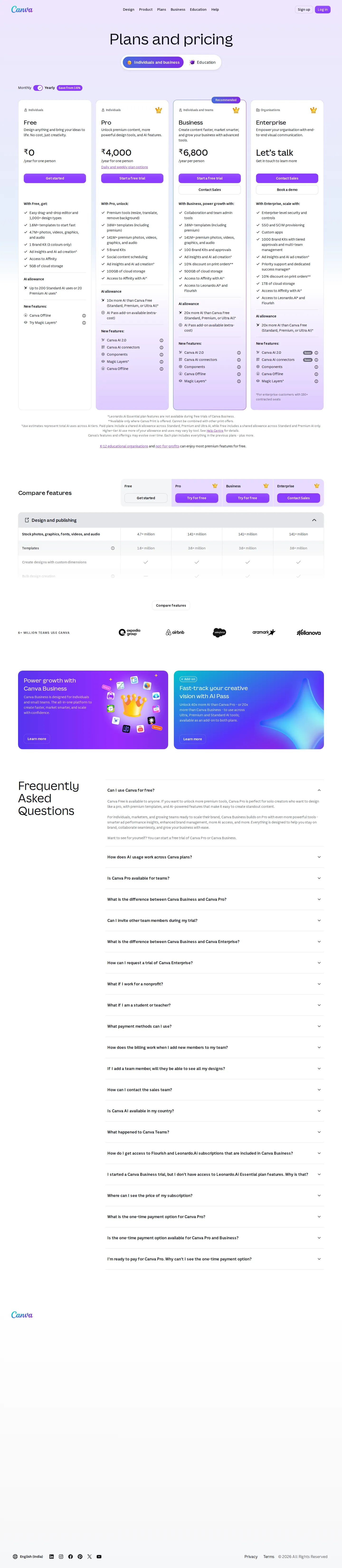
Four-tier seat + AI-credit structure with AI Pass add-on
Current structure: Free, Pro (~US$15/mo), Business (~US$20/user/mo), Enterprise (custom). Each paid plan carries a shared tiered AI allowance (Standard/Premium/Ultra 'AI uses'); Pro ~10x Free, Business ~20x Free. An AI Pass add-on sells up to 40x Pro's allowance (or 20x Business's) for ~US$100/user/mo. Enterprise reserves a dedicated success manager for 150+ contracted seats.
Partial walk-back after backlash — 'Pricing Promise'
Following widespread cancellations and social-media backlash, Canva walked back part of the change, letting existing Teams customers keep adding members under prior terms and introducing legacy-pricing protections and advance-notice commitments for small teams.
Teams repriced to per-seat ~US$100/user/yr (3-seat minimum)
Canva emailed customers a Teams price increase: the flat 5-person bundle was replaced by per-seat billing near US$100/user/year with a 3-seat minimum (US$300/yr floor). For some legacy 5-person plans the headline jump approached 317% (about US$120/yr to US$500/yr), softened by a 40% first-year discount. Canva cited new AI/Magic Studio features as justification.
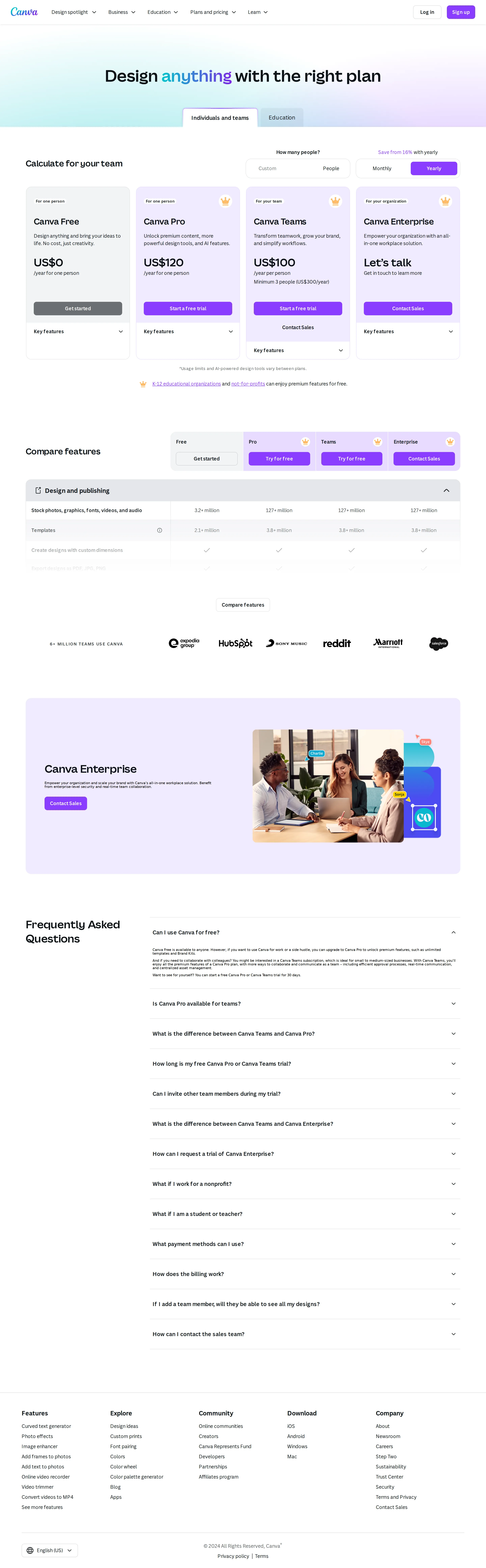
Canva for Teams as US$300/yr flat for first 5 people
Pre-hike structure: Free US$0, Pro US$119.99/yr (now framed for one person), Canva for Teams at US$300/year total for the first 5 people, Enterprise contact-sales (minimum 100 people). Teams is still a flat bundle, not per-seat.
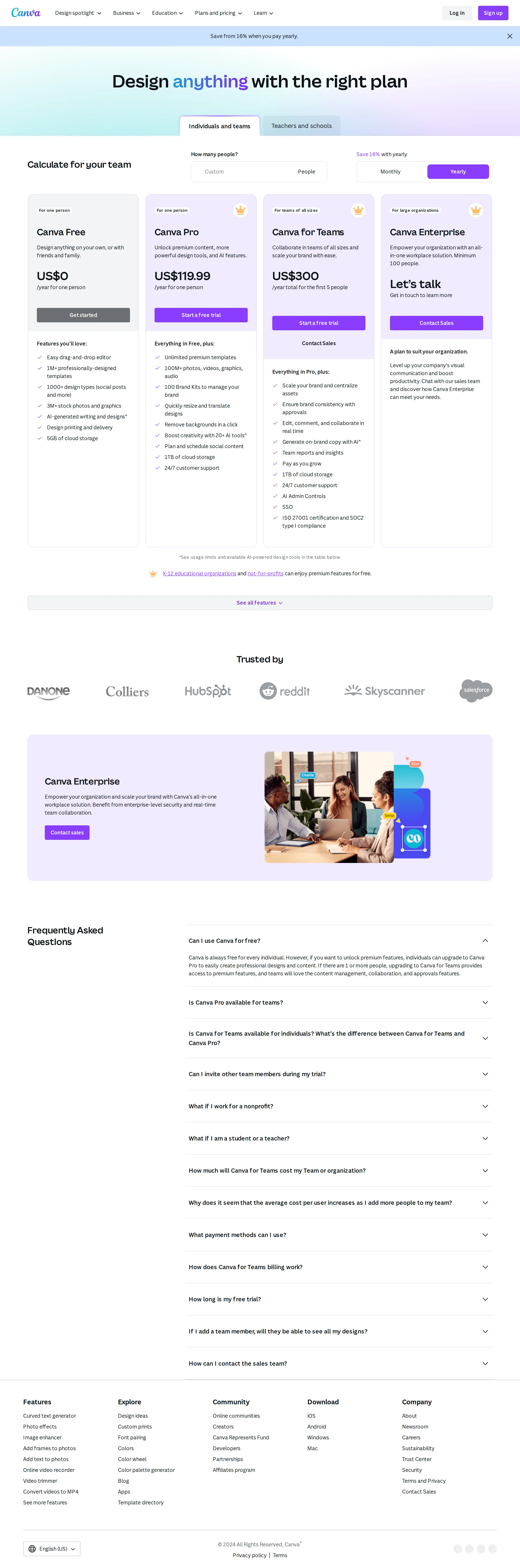
Affinity acquisition begins bundling into paid plans
Canva acquired the Affinity design suite (March 2024) and later acquired Leonardo.ai (July 2024); both became bundled inclusions in paid tiers rather than standalone SKUs, reshaping the value story of Pro/Business.
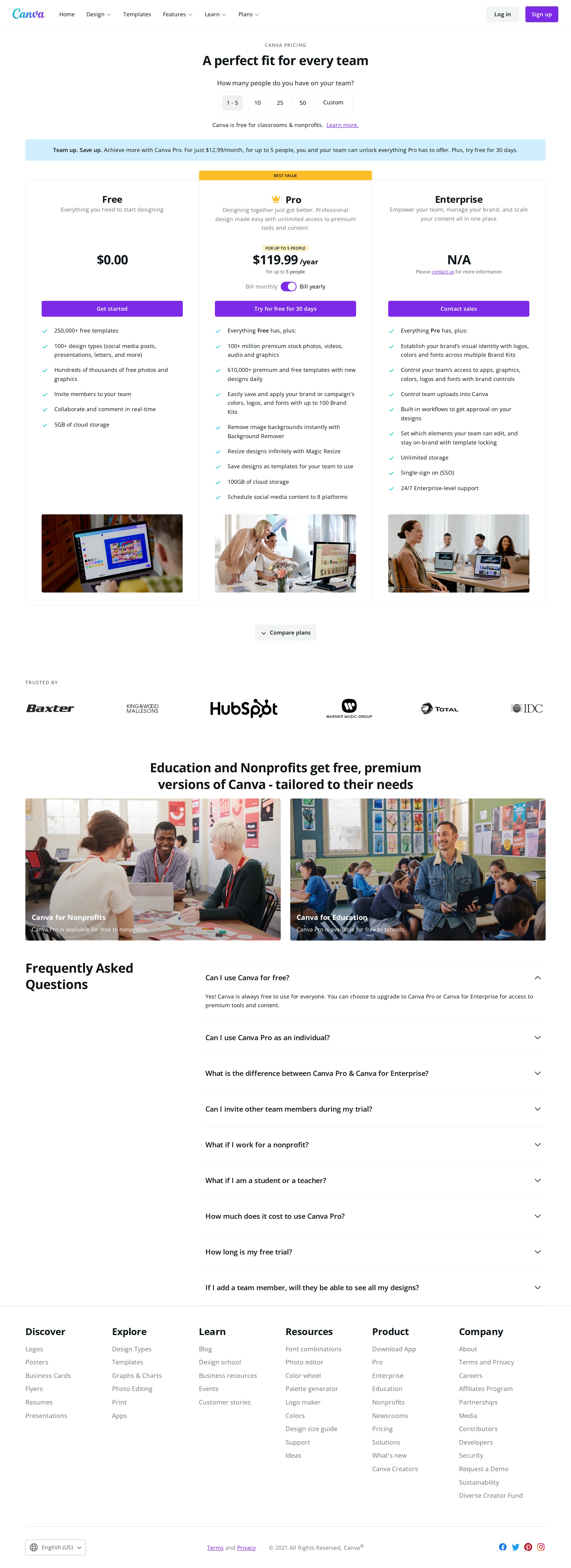
Pro at US$12.99/mo, US$119.99/yr for up to 5 people
Canva Pro is US$12.99/month or US$119.99/year covering up to 5 people; additional members are US$5/month each. Free is US$0 and Enterprise is contact-sales. The flat 'team in one Pro plan' structure is the defining legacy shape.
Canva Teams rebranded to Canva Business; Pro raised to US$15/mo
Canva for Teams was rebranded to Canva Business (a 'What happened to Canva Teams?' FAQ now explains the change). Pro settled at US$15/month or US$120/year; Business at ~US$20/user/month or US$200/user/year. Affinity, Leonardo.ai (Apprentice/Essential) and Flourish access were folded into paid tiers.
Canva for Work becomes Canva Pro at US$12.95/mo
The paid tier launched as 'Canva for Work' at US$9.95/month in 2015, then rebranded to Canva Pro around 2018 at roughly US$12.95/month — establishing the flat, seat-light subscription that held for years.
- · Canva spent roughly nine years keeping Pro pricing nearly flat — from US$12.99/month in 2018 to US$15/month in 2025 — then a single September 2024 Teams repricing (a ~317% jump for some legacy plans) triggered one of the loudest SaaS pricing backlashes of the year.
- · The 2024 change converted Canva for Teams from a flat 'US$300/year for the first 5 people' bundle into per-seat billing at ~US$100/user/year with a 3-seat minimum — quietly tripling the bill for small teams that only had two or three users.
- · Canva bought design-suite rival Affinity (March 2024) and image-model lab Leonardo.ai (July 2024), then bundled both into paid tiers — turning two acquisitions into plan-differentiation features rather than standalone SKUs.
Questions & answers
- How much does Canva cost in 2026?
- Canva has four tiers: Free ($0), Pro ($15/month or $120/year for one person), Business ($20/user/month or $200/user/year), and Enterprise (custom, contact sales). Annual billing saves roughly 16–33% versus monthly.
- What is the difference between Canva Pro and Canva Business?
- Pro is a single-person plan with premium content, AI tools, and 100GB storage. Business is the multi-seat plan that adds team collaboration, brand controls and approvals, more AI allowance (~20x Free vs Pro's ~10x), 500GB storage, and access to Leonardo.Ai Essential and Flourish — billed per user. Note: Leonardo.Ai Essential features are excluded during a Canva Business free trial and unlock only once the trial converts to a paid subscription.
- How does Canva's AI usage work across plans?
- Paid plans include a shared AI allowance measured in tiered 'AI uses' across Standard, Premium, and Ultra AI tools. Higher-quality generations consume more of the allowance, and you can buy an AI Pass add-on (up to 40x Pro or 20x Business) for an extra $100 per user per month.
- What happened to Canva Teams?
- Canva for Teams was rebranded to Canva Business. Before that, a September 2024 repricing converted Teams from a flat '$300/year for 5 people' bundle to per-seat billing near $100/user/year with a 3-seat minimum, which prompted a backlash and a partial walk-back in October 2024.
- Is there a minimum number of seats for Canva Business?
- The 2024 Teams/Business repricing introduced a 3-seat minimum (a ~$300/year floor on annual billing). For a single seat, confirm current terms at checkout, since Canva continues to adjust how small teams are billed.
- Does Canva have a free plan?
- Yes. Canva Free is permanent and includes the editor, 1.6M+ templates, millions of stock assets, 5GB storage, and a limited AI allowance (around 200 Standard or 20 Premium AI uses). K-12 schools and nonprofits get most premium features free.